

Search and Filters
QPR - Complete/Forward/Submit
A Quarterly Performance Report (QPR) record must be completed, optionally forwarded for approval and then submitted to progress the QPR to the Agency for acknowledgement. To complete a QPR record, navigate to and open the QPR record:
QPR - Acknowledge
The Agency Contract Manager (ACM) is responsible for acknowledging the Quarterly Performance Report (QPR) from within the Indigenous Procurement Policy Reporting Solution (IPPRS).
Agency Assessment
When all QPRs for the contract have been acknowledged, the Agency Contract Manager completes the Agency's assessment of the MMR performance of the contract using the Indigenous Procurement Policy Reporting Solution (IPPRS).
Profile
On your first login to the Portal, the Profile page will be automatically displayed.
To Do List
The To Do list displays a list of your contracts that currently require some form of action. It is the most effective means of viewing and actioning the contracts that you are assigned to report on.
To Do List - Action Contract
Action Contract
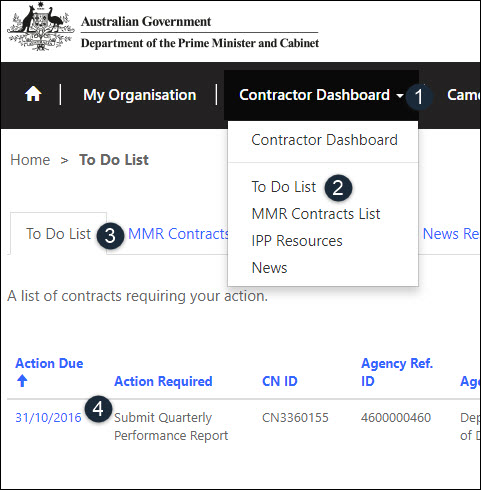
To action a contract record from the To Do List, navigate to the To Do list and click on the Action Due link:
MMR Contracts List
The Mandatory Minimum Requirements (MMR) Contracts List provides a list of MMR contracts that are that are awarded to your organisation.
There are two list views:
IPP Resources
The IPP Resources section provides you with a list of resources useful when working with the Indigenous Procurement Policy:
IPP News
The IPP News page section provides important information in relation to the Contractor Portal and may include:
Contact Us
Please refer to the contact below for a list of contacts to assist users understand and troubleshoot any issues found within the Indigenous Procurement Policy Reporting Solution (IPPRS).
Records and Hyperlinks
This section provides details about searching for records and the difference between accessing a record and a record containing hyperlinks.
IPPRS System Icons
IPPRS System Icons
The table below provides a list of standard icons and descriptions that are used throughout the Indigenous Procurement Policy Reporting Solution (IPPRS).
|
Icon |
Description |
|---|
To Do List - Action Contract
Open / Action Contract
To open and action a contract record from the To Do List, first access your Dashboard and navigate to the To Do List:
Researchers
Commonwealth Officers (Researchers) are required to view and evaluate the current and past performance of external contractors, in terms of their MMR and Indigenous Participation Plan compliancy.
Set Personal Options
The personal options is used to personalise the workspace to suit a user's requirements or preferences. One of the options includes choosing the default page that is displayed when logging into the IPPRS.